
Registration System
- Create/Update parent/student profile
- Add/remove classes
- View balance/credit
Note: DO NOT use email addresses with domain name @icloud.com as all our emails are blocked by this domain name.
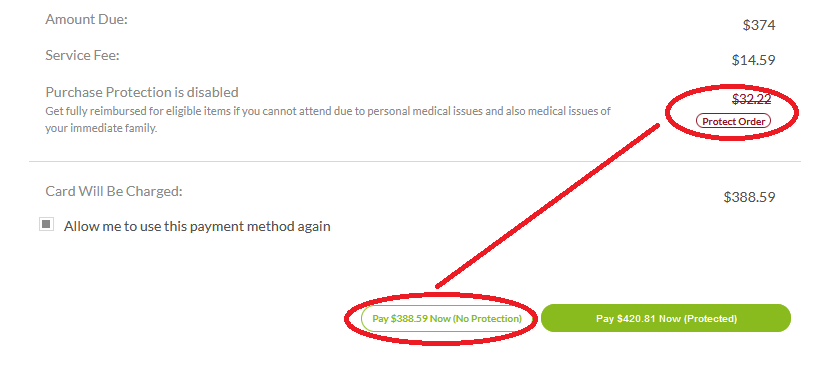
Payment Summary
Multiple payment methods are available:
- Credit Card (Non-refundable transaction fee of 3.9%)
- eCheck (Non-refundable transaction fee of 2.1%)
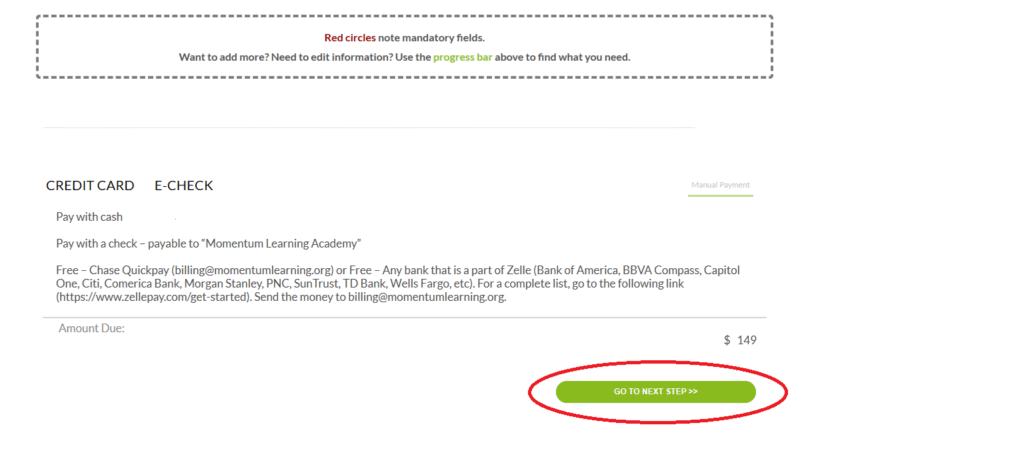
- Manual Payment (No transaction fee): Zelle / Check / Cash
- Paypal is not accepted
Manual Payment – No Additional Charge
To use this option, you will leave our registration page (after you add the class). Send us the money directly from your bank. You do not need to notify us after you make the manual payment. Our staff will process your payment once received and will send you a receipt within 1-2 business days.
- Zelle* (billing@momentumlearning.org) In the QP/Zelle memo section, please make sure you include the student’s name and the class.
- Checks – payable to “Momentum Learning Academy”, mail it to 2310 Settlers Way Blvd, B, Sugar Land, TX 77478 or email photos of the front and back of the check to info@momentumlearning.org. In the note section, please make sure you include the student’s name and the class.
- Paypal is NOT accepted at this moment
* Zelle – Any bank that is a part of Zelle (Bank of America, BBVA Compass, Capitol One, Citi, Comerica Bank, Morgan Stanley, PNC, SunTrust, TD Bank, Wells Fargo, etc.).
Credit Card (Non-refundable transaction fee of 3.9%)
- If you have logged out, you need to log into your registration page again.
- On the check out page, enter your Credit Card information. You will get a receipt automatically after the payment.
- The 3rd party charges a non-refundable transaction fee of 3.9%.
eCheck (Non-refundable transaction fee of 2.1%)
- If you have logged out, you need to log into your registration page again.
- On the check out page, enter your bank account information. You will get a receipt automatically after the payment.
- The 3rd party charges a non-refundable transaction fee of 2.1%.
Invoice
- To receive an invoice, (log into your profile), click “GO TO NEXT STEP>>”
Please check your spam folder as well as your promotion tab for invoices.
Receipt
- If you paid with a credit card or echeck, you will get a system receipt automatically.
- If you paid with other methods, a receipt will be sent out after we receive your payment (it may take 1-2 business days to process manual payments). After it’s processed, you will see the updates when you log into your profile.
- Please check your spam folder as well as your promotion tab for invoices/receipts.